Plan & billing
What your shop has, how it is paid for, and what you see when you open something it hasn't got.
Where: menu → Account → Plan & billing.
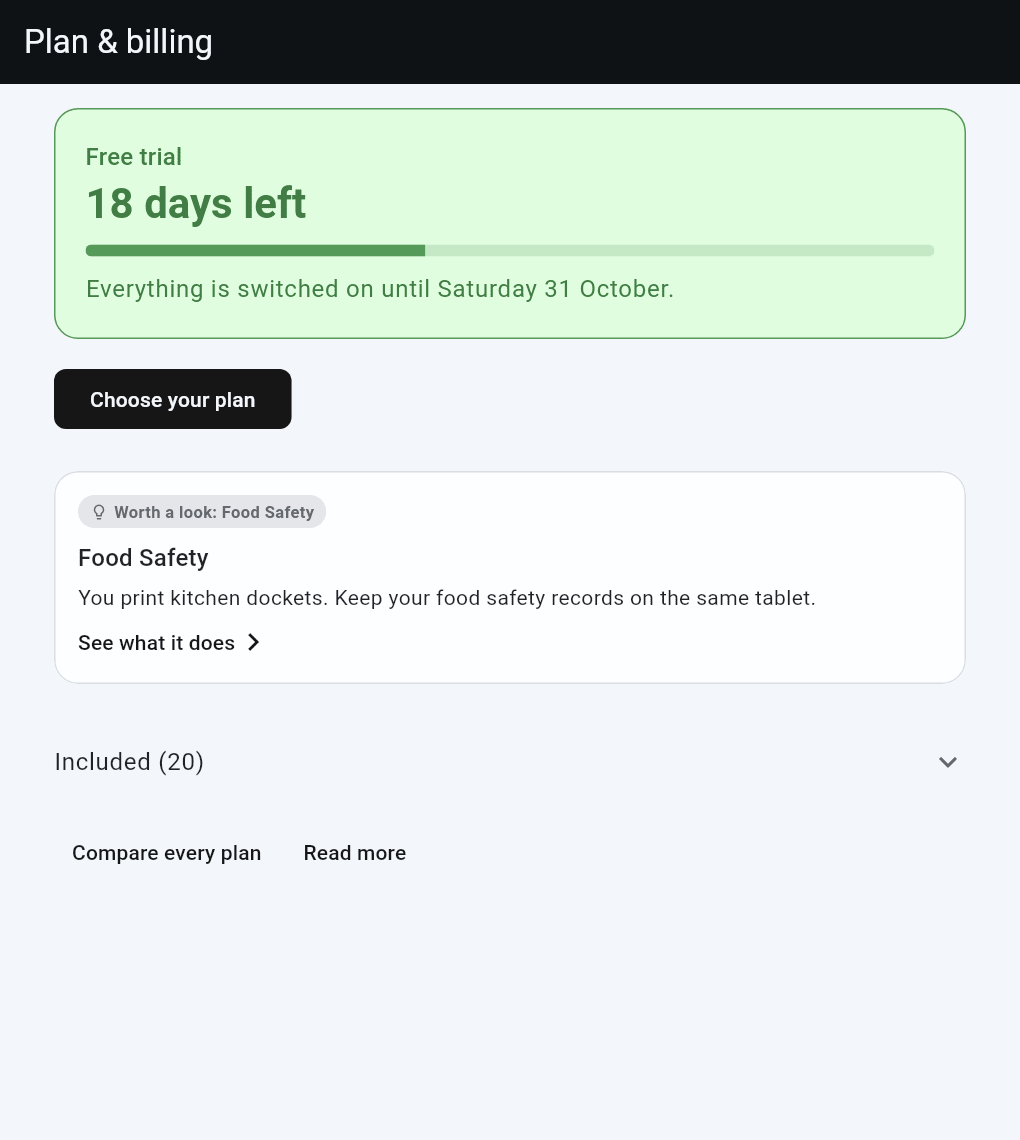
The top of the page says where your shop is: how many days of the free trial are left, or what you pay for and until when, or that the shop is read-only.
Under it, the page may suggest one thing worth a look, picked from how your shop is set up: two registers, a few staff, or a kitchen printer. Tap it to see what it does.
Used this month shows how much your shop has used the things that are counted: AI requests (Ask AI, voice entry, rosters and other AI help; one question can take a few requests) and new-order texts. Your plan includes them. Each shop has a daily allowance of AI, well above normal use; if it is ever reached, the AI says so and starts again the next day.
Included and Not in your plan are folded at the bottom. Tap either to open it, and tap anything in "Not in your plan" to see what it does.
Nothing is hidden anywhere else either: if your plan does not include a screen, opening it shows a short page about it instead.
What a shop has
Each shop has one or more products and is on Lite or Posuku Pro.
| Product | What it is |
|---|---|
| POS Lite | Your register: taking payment in person (card terminal, cash), receipts and dockets, laybys, labels, customers' names and phone numbers, standard reports. |
| Online store | Your own online shop for pickup and delivery. On its own, it can make and manage orders in the app too; only taking payment in person needs POS Lite. |
| Food Safety | Your food safety records: forms, schedules, checks and reports. |
| Temperature alerts | Wireless sensors in your fridges and freezers, with alerts. |
| Inventory | Stock on hand, deliveries, stocktakes, wastage and margins. Goes alongside POS Lite or the Online store. |
Posuku Pro is one step up for the whole shop. It adds tools for a team, for regular customers, and AI that does the daily work with you.
| Comes with Posuku Pro | Where you'd find it |
|---|---|
| More than one register | Sales → Setup → Registers |
| Tables and the floor plan | Sales → Tables, and Sales → Setup → Tables |
| Ordering from the table by QR code | Sales → Setup → Tables |
| Ask AI | Sales → Reports, the Ask AI tab |
| Briefing | The Briefing button at the top of the screen |
| Clocking in and out, timesheets and rosters | Staff → Timesheets, Staff → Roster |
| Loyalty stamp cards | Sales → Setup → Loyalty programs |
| Gift vouchers | Sales → Vouchers |
| Customer accounts and statements | A customer's page, and Account at the payment screen |
| Voice entry | Food Safety, the microphone button |
| The review drafted for you | Food Safety, starting a review form |
Nothing on Lite has a limit except registers: you use one, on as many devices as you like. You can set up more and switch between them. Products, staff, forms and your sales history are unlimited.
The page you see instead
Open something your shop hasn't got and you see, in place of the screen:
- what it does, in a sentence or two, often with a picture of it in use
- which product or plan brings it
- Read more, which opens its help page
- in some versions of the app, a button to see plans
Nothing you have entered is affected. If your shop used something before and no longer has it, its records are kept, ready if you add it again.
Trying something
We can let your shop try a product, or Posuku Pro, for a while. Your plan then shows it as "to try, until" a day. The day after, it switches off by itself; anything you entered while trying it is kept, ready if you add it.
Your first 30 days
A new shop starts with 30 days of everything, free, with no card.
For the last week, a line at the top of the sell screen and the Food Safety dashboard says which day the trial runs until.
When the 30 days are up, the shop becomes read-only until a plan is chosen. Nothing is deleted.
| Read-only | |
|---|---|
| Sign in, and see every screen | Yes |
| Reports, and exports of every record, food safety included | Yes |
| New sales, payments and laybys | No |
| New food safety records, stock deliveries, stocktakes, wastage, clocking in | No |
| Online ordering | Closed. Your shop page stays up. Orders already placed can still be accepted. |
A line at the top of the sell screen and the Food Safety dashboard says the shop is read-only, and the stopped buttons say the same.
A shop that is paused between seasons is read-only in the same way.
Once a plan is chosen, open online ordering again from Online → Ordering.
Choosing and changing your plan
Where the page shows Choose your plan, the owner picks the plan there, in three steps:
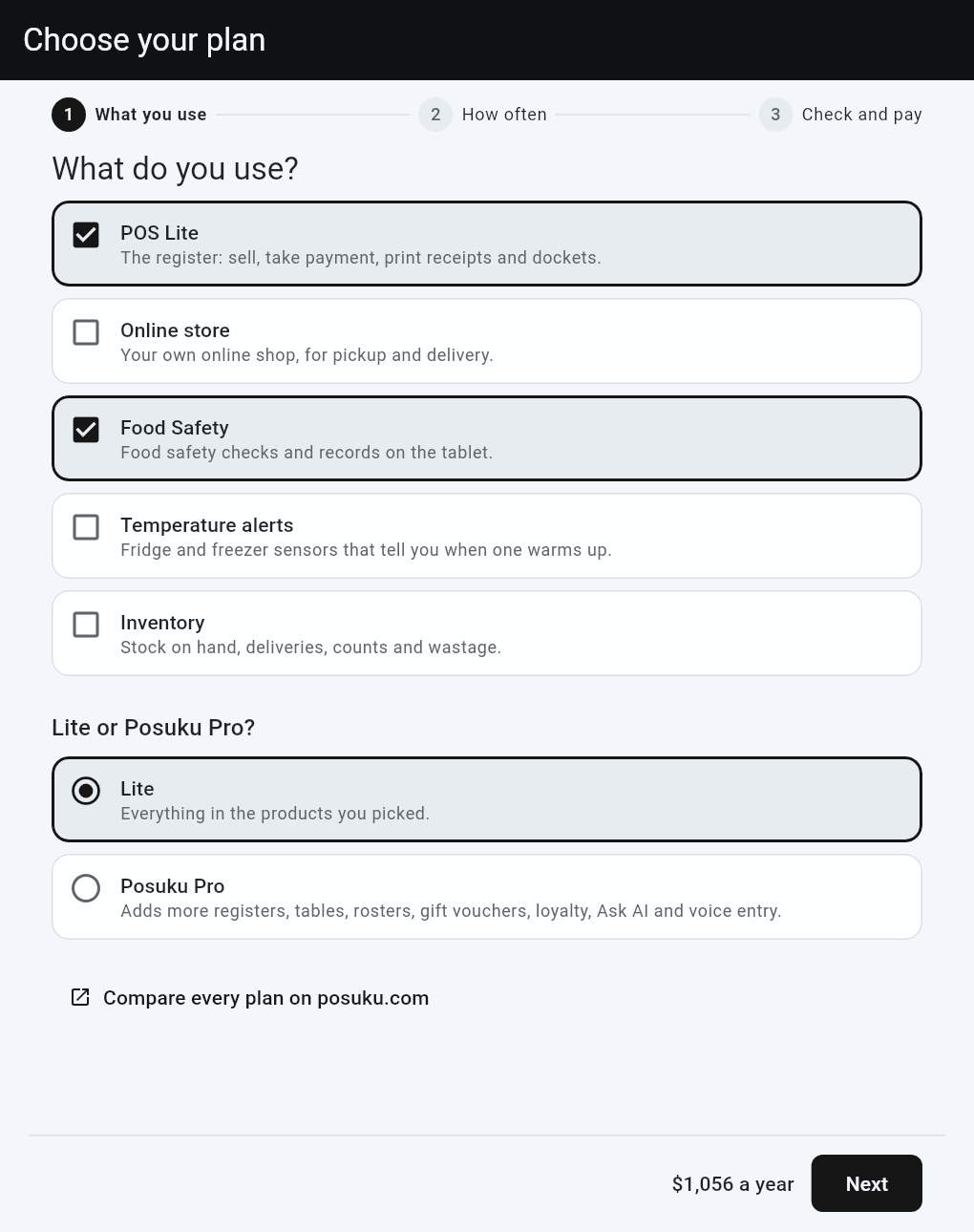
- What do you use? Tick the products you want, then pick Lite or Posuku Pro. The total at the bottom updates as you tick.
- Monthly or yearly? Both as a price a month, with what yearly saves. Tap one.
- Check and pay. The page lists what you picked, the total, and the day you are first charged. Tap Go to payment. A secure card page opens. Pay there, and it brings you back. To come back without paying, use the arrow at the top left of that page.
Your plan shows on Plan & billing within a few seconds, and reaches every device in your shop within a few minutes.
Paying before your trial ends keeps your free days: your card is saved, and the first charge comes when the trial ends. Step 3 says on which day.
The emails we send near the end of your trial have a link that signs you straight in to this page in a web browser, with no password or code. Each link works once, for three days. After that it asks you to sign in as usual, then opens this page.
Once your shop pays, the page shows Change plan. It opens the same three steps, starting from what you have. Change what you want, tap Change plan on step 3, and the page says what happens to your bill before you confirm:
| Change | What happens |
|---|---|
| Add a product, or Posuku Pro, on yearly | The rest of your year is charged now, so everything renews on one day |
| Add something on month to month | It goes on your next bill |
| Take something off | It stays until your plan renews. No refund. |
| Month to month to yearly | A new year starts that day. What is left of the month comes off it. |
| Yearly to month to month | Email support@posuku.com |
Card and invoices opens a secure page where you update your card, download your invoices, or cancel. A cancelled plan runs to the end of what you have paid for, and the screen says the day it ends.
Choose your plan shows in Posuku in a web browser and on a computer. The phone and tablet apps show your plan but not the prices: sign in on a computer to choose or change it, or email support@posuku.com and we change it for you. A shop billed by invoice changes its plan by email too.
Good to know
- Staff see the same facts as owners. Only the owner, or staff with admin permission, see Choose your plan.
- A plan is set for each shop. A second shop has its own.