Register
Open the till in the morning, count it at night, and see what the difference was.
Where: menu → Sales → Register.
Opening
If the register is closed the screen offers Open Register. You are asked for:
- Opening cash amount — the float. It fills in with last time's float.
- Optional note.
OPEN stays greyed out until one of the two has something in it, so you cannot open a register on nothing by accident.
Nobody can take payment on a closed register, so this is the first job of the day.
Counting up
The screen is three columns: EXPECTED, ACTUAL, DIFFERENCE. You fill in the middle one.
The expected figure is on screen while you count
There is no blind cash-up. If you want the count done without sight of the figure, that is a matter of who does the counting, not a setting in the app.
| Field | What to put in it |
|---|---|
| Total in cash drawer | Everything in the drawer now. Tap it to count by denomination. |
| Less cash at start (float) | What you opened with |
| Plus cash spent (purchases) | Petty cash taken out of the drawer |
| All cards total | From your card terminal |
| Card fees | From your card terminal |
| On Account | Purchases put on customer accounts |
| Vouchers, Gift Cards | Purchases paid with vouchers |
Tapping Total in cash drawer opens Count cash-units: a row per denomination, you enter how many of each, it does the arithmetic and keeps the breakdown with the cash-up.
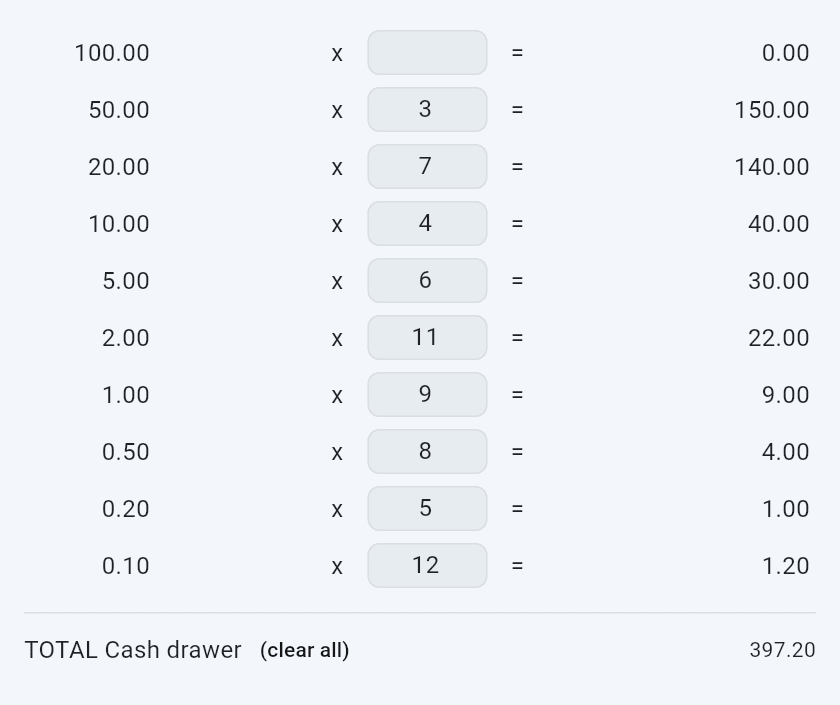
Leave a denomination blank if you have none of it. (clear all) beside the total empties every row, for when you have lost count and want to start the drawer again.
Cash total, Card total and Total received are worked out for you. DIFFERENCE shows red when you are short, green when you are over.
Your typing is kept as you go. Come back to a half-finished count and you get "Previous data restored. You can continue where you left off."
Closing
Close Register asks Close Register? — "This will finalise all sales and payments". At least one field must have something in it; on an empty form you get "Enter data in any field."
Closing writes the cash-up: your figures, the denomination breakdown, and the system's own expected figures captured at that moment. Then the register is closed and you land on the cash-ups list.
Close Register is greyed out, with a line at the top saying why, while:
- the till is offline. "Offline. The register can't be closed until you're back online."
- sales made on this till are still waiting to send. The expected figures come from what has reached the server, so they would be short. It says how many, for example "2 sales are still waiting to send.", and the button comes back once they have gone, usually within a minute of the connection returning.
You cannot un-close a register. You open it again for the next session, and a mistake in the figures is fixed by correcting the cash-up rather than by reopening it.
Past cash-ups
The ⋮ menu → Cash ups lists every close of this register with its counts. Filter by register or All.
Opening one shows what was counted, with expected and the difference under each, plus who closed it and when. Cash-ups from before the app kept expected figures say so rather than showing a blank.
Correcting one
Correct this cashup on a past cash-up. You can change the counted figures, the denomination breakdown and the note. A Reason for the correction is required — "Required. Kept on the record with your name."
It asks to confirm, then needs a manager's PIN.
What you can never change is the expected figure. That is the system's own number, captured at close. It is what keeps a correction honest: the counted side can be put right, the figure it is measured against cannot be moved to meet it.
Corrected figures become the figures — no asterisk, no crossing out — with a Corrected badge. Corrections below opens the full history: when, who, what moved and why.
Opening the drawer without a sale
⋮ → Open cash drawer. "Without a sale. Asks for a PIN, and is recorded against it."
It asks who is at the till, then checks permission, then kicks the drawer, and records the event. Rare and worth explaining if it shows up on a report.