Inventory
What you hold, what it cost you, and what each thing you sell makes you. Every number here is worked out from something that happened -- a delivery, a sale, a count -- never typed in over the top of the last one.
Where: menu → Inventory → Dashboard. The Inventory group appears only once inventory is switched on for your shop. It is off until you ask us.
Four words to learn first
| Word | What it is | At Marlow & Vine |
|---|---|---|
| Stock item | A physical thing you hold, counted in one unit | Bread flour, in grams. Sparkling water, each. |
| Outer | How a stock item arrives | A 25 kg bag of flour. A case of 12 sparkling water. |
| Product | A way of selling something. What the till rings up. | White sourdough loaf, $9.50 |
| Recipe | What one sale of a product takes off the shelf | One loaf takes 500 g of flour |
There are two kinds of thing on your shelves, and they are set up in two places:
| You sell it | Set it up | Page |
|---|---|---|
| Exactly as it arrives -- a bottle of sparkling water, a jar of quince paste, cheddar cut to weight | Turn on Track stock on the product. The product is its own stock item: one sold, one off. | Stock, in the product editor |
| Made from something -- a loaf from flour, a croissant from flour and butter | Add the raw thing as an ingredient, then list it in the product's Ingredients | Ingredients, and Ingredients, in the product editor |
Where each number comes from
| Number | Where it comes from |
|---|---|
| On hand | Where you started, then every sale, delivery, count, wastage entry and adjustment since. Nothing else changes it. |
| Avg cost | What you paid on your deliveries, averaged across what you hold. Stock you started with is valued at the cost typed on the item. |
| Stock value | On hand at that cost |
| A product's cost | Its recipe, at each ingredient's cost |
| Margin | The price with tax taken out, less the cost, as a share of that price |
| Days left | What you hold now, over what went out each day last week. It moves as you sell and restock. |
Every cost and every margin is before tax. Your prices include GST and your costs do not, so the GST comes off the price before the two are compared. A loaf at $9.50 is $8.26 before 15% GST; at a cost of $2.80 that is a 66.1% margin, not 70.5%.
What moves stock
| What happens | When it moves | Which way |
|---|---|---|
| A sale at the till | When the order is fully paid | Off |
| A layby | When it is paid off, not when it is started | Off |
| An online order | When you accept it | Off |
| A delivery | When you save it | On |
| A stocktake | When you finish it, by the difference only | Either |
| Wastage | When you log it | Off |
| An adjustment | When you save it | Either |
A refund does not put anything back on the shelf yet. If the goods come back sellable, adjust them back in with a note. If they cannot be sold, log them as wastage with Customer return.
What needs me today
The Inventory screen is a list of things to do. Each row says what is wrong, how many, and which ones, and opens the place it gets put right.
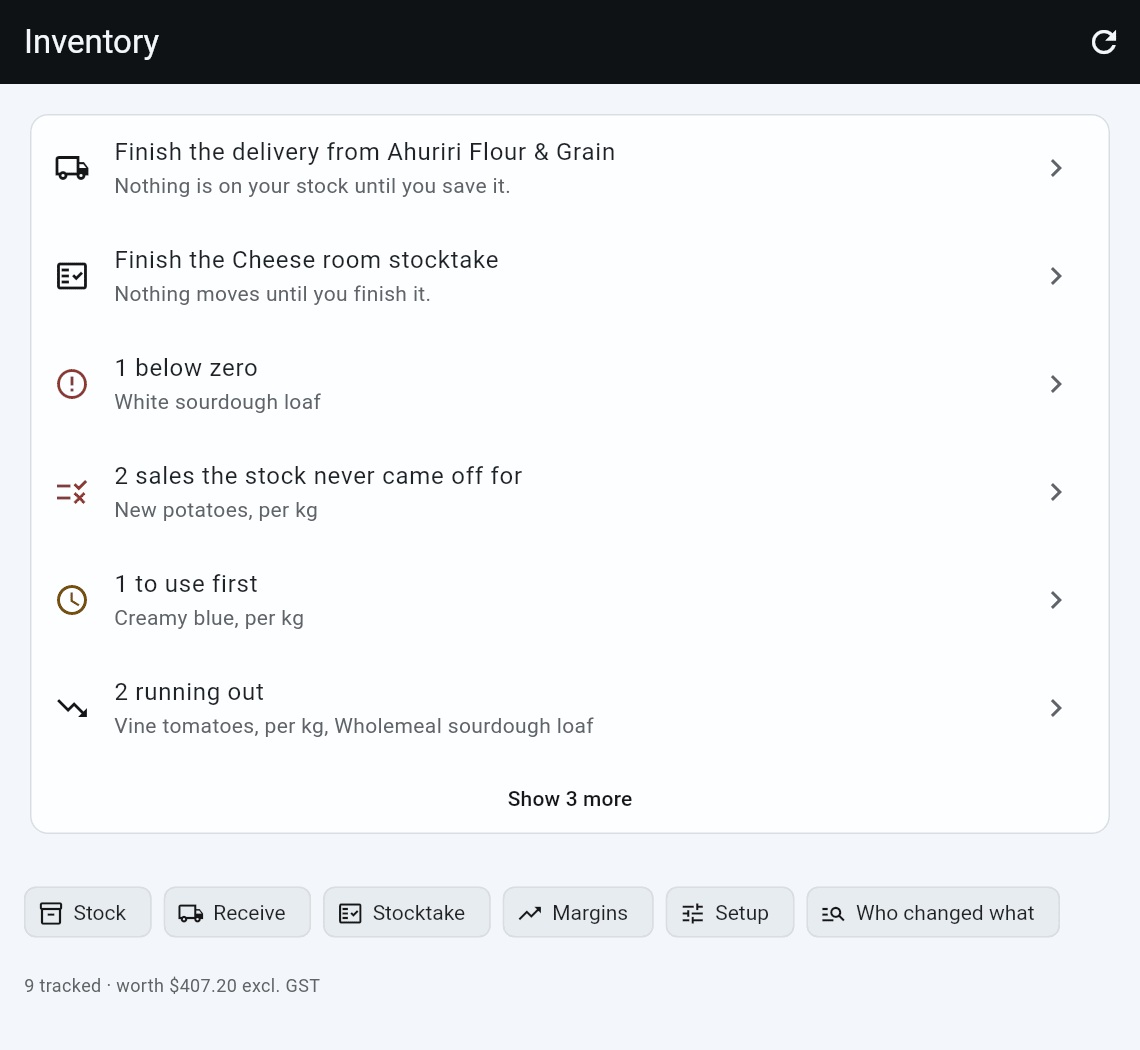
| Row | Means | Opens |
|---|---|---|
| Finish the delivery from ... | Somebody started a delivery and did not save it. Nothing is on your stock until they do. | That delivery |
| Finish the ... stocktake | Same, for a stocktake. Nothing moves until it is finished. | That stocktake |
| n below zero | You have sold more than you ever received or counted | A stocktake of just those |
| n at their minimum | At or under the Warn me at you set on the item: Hazelnut brownie · 5, warn at 6. Not below zero -- those are on the row above. | Those items |
| n sales the stock never came off for | Something sold and the stock did not move. Your on-hand is higher than what is on the shelf. | Those items |
| n to use first | A batch within a week of its best-before date (you can change the week in Setup), or near the end of what you said they keep for | Those items |
| n running out | Fewer days left than a delivery takes to arrive. Anything already at its minimum is on that row instead. | Those items |
| n changed price this week | A buying price moved on a delivery. Your margin moved with it. | The what-if, or those items |
| n not counted in 28 days, n never | Due for a count. Things you have never counted are said separately, because there is nothing overdue about them. | A stocktake of just those |
| n not sold in a week | Not sold in a week. Counting it or receiving it does not clear this row. | Those items |
The order is not by size, it is by what to do first. Half-finished deliveries and stocktakes come top, because until they land every other number on the screen is working off stale figures. Then what is wrong, then what you asked to be told about, then what is on a clock, then what can wait.
When there is nothing to do, it says so. That is the answer you came for.
"To use first" follows the shelf, not the calendar. It works backwards through your deliveries until they add up to what you have now, and ages the one it lands on. So milk delivered every day, with a day's worth in the fridge, is as fresh as today's delivery and does not appear. A batch works the same way: one already sold through does not appear, however close its date.
Long lists are cut short. Six rows show, with Show n more underneath, so the doors below stay in reach. The worst is always at the top, so nothing urgent hides behind it.
Under the list are the doors -- Stock, Receive, Stocktake, Margins, Setup and Who changed what -- and a line saying how much you track and what it is worth.
Three of these rows use numbers you can set, under Setup: how few days counts as running out, how often everything should be counted, and how far a price has to move to be worth mentioning. When to warn you and how long something keeps are per item, on the item itself -- Warn me at and Good for, on its Stock page.
Getting started
Until you have done these, they sit at the top with a tick beside the ones that are done:
- Track one thing you sell
- Count what you have
- Save a delivery
- If you make things: say what they are made of
Step 4 is only for a shop that makes things, like a café or a bakery. Once the first three are done the block goes for good, whether or not you did step 4. You can always add a recipe later from Margins.
Above them, until you have done any of it at all, is a short note on what you get out of keeping stock and where to start. It goes as soon as you track your first thing.
Stock figures update by themselves when you open the app and every few minutes after, including what other tills have sold. The refresh button at the top fetches everything straight away, for when another till has just done something and you would rather not wait.
Negative on hand is the number to watch. It means you have sold more of something than you ever received or counted -- usually a delivery that was never posted, or tracking switched on before a first count. A count puts it right.
Who changed what
Adjustments, wastage and finished stocktakes over the last 28 days, grouped by the person who posted them, with the reason each time and what it came to. Sales are not on it: the question is who is writing numbers by hand, and four adjustments buried under four hundred sales is not an answer.
Most of what it shows is people doing their job, and the reason beside each figure is usually the whole explanation. What it is for is the case where one person's shrinkage is ten times everybody else's, which no amount of staring at stock levels will ever show you.
A movement with nobody's name on it shows as Not recorded rather than being left out -- a report that quietly drops rows is worse than one that admits what it cannot tell you.
It is a report, so it sits behind View reports like the others. Who may adjust a number, and who may change a cost, are two separate bars under Staff → Permissions.
The menu
| Menu | What it is for | Page |
|---|---|---|
| Dashboard | What needs doing today | This page |
| Stock | What you hold, and putting a number right | Stock |
| Receive | Booking a delivery in against its invoice | Receive |
| Suppliers | Who you buy from, their codes, and what came from them | Suppliers |
| Ingredients | The things your products are made from | Ingredients |
| Stocktake | Stocktakes: a shelf, a location, or the whole shop | Stocktakes |
| Margins | What each product makes, and what a price rise does to it | Margins |
| Setup | How supplier prices are shown, when a price move is flagged, and what lands on the work list | Inventory setup |
Your first week
The order that works, using Marlow & Vine's white sourdough loaf.
- Add the first thing you buy. Inventory → Ingredients → New ingredient: Bread flour, counted in grams, shown as kg.
- Tell it how you buy it. Under How you buy it, a 25 kg bag at $42.50. The cost per gram works itself out underneath. Scan the bag into Outer barcode. See Outers.
- Join it to something you sell. Sales → Products → the loaf → Ingredients → Add ingredient → Bread flour, 500 g.
- Count what is on the shelf. Type Quantity on hand now when you create the ingredient, or Inventory → Stocktake → Start a stocktake.
- Sell it. Ring up a loaf and take payment. 500 g comes off the flour.
- Take a delivery. Inventory → Receive → Receive delivery. Scan the bags, type the invoice, Save delivery. See A delivery.
- Put a number right. Inventory → Stock → the flour → Adjust.
- Log wastage. Inventory → Stock → the flour → Log wastage → 500 g, Dropped/Spilled.
- Check the margin. Inventory → Margins, then What if with flour at a new price.
- Look at the dashboard.
Good to know
- Stock is per shop. Each shop counts, receives and values its own. A product shared between shops shares its name and barcode, not its shelf.
- Saving a delivery and finishing a stocktake need a connection.
- Nothing is edited after the fact. Every change is a new entry, so a wrong one is put right with another: an adjustment, or the next stocktake.
- Anyone who can reach these screens can adjust and log wastage. Changing a price from Margins asks for the same approval as changing a price at the till, if you have set one.
Not yet
Purchase orders, credit notes and returns to a supplier, refunds that put stock back, freight inside a product's cost, and batches of prep are not here yet. Nothing tells you about stock while the app is closed: open Inventory to see what is at its minimum.