Margins
What each product makes you, and what a change in one ingredient's price would do to every product that uses it.
Where: menu → Inventory → Margins. Two views, switched at the top: List and What if. The truck icon beside them opens Freight.
List
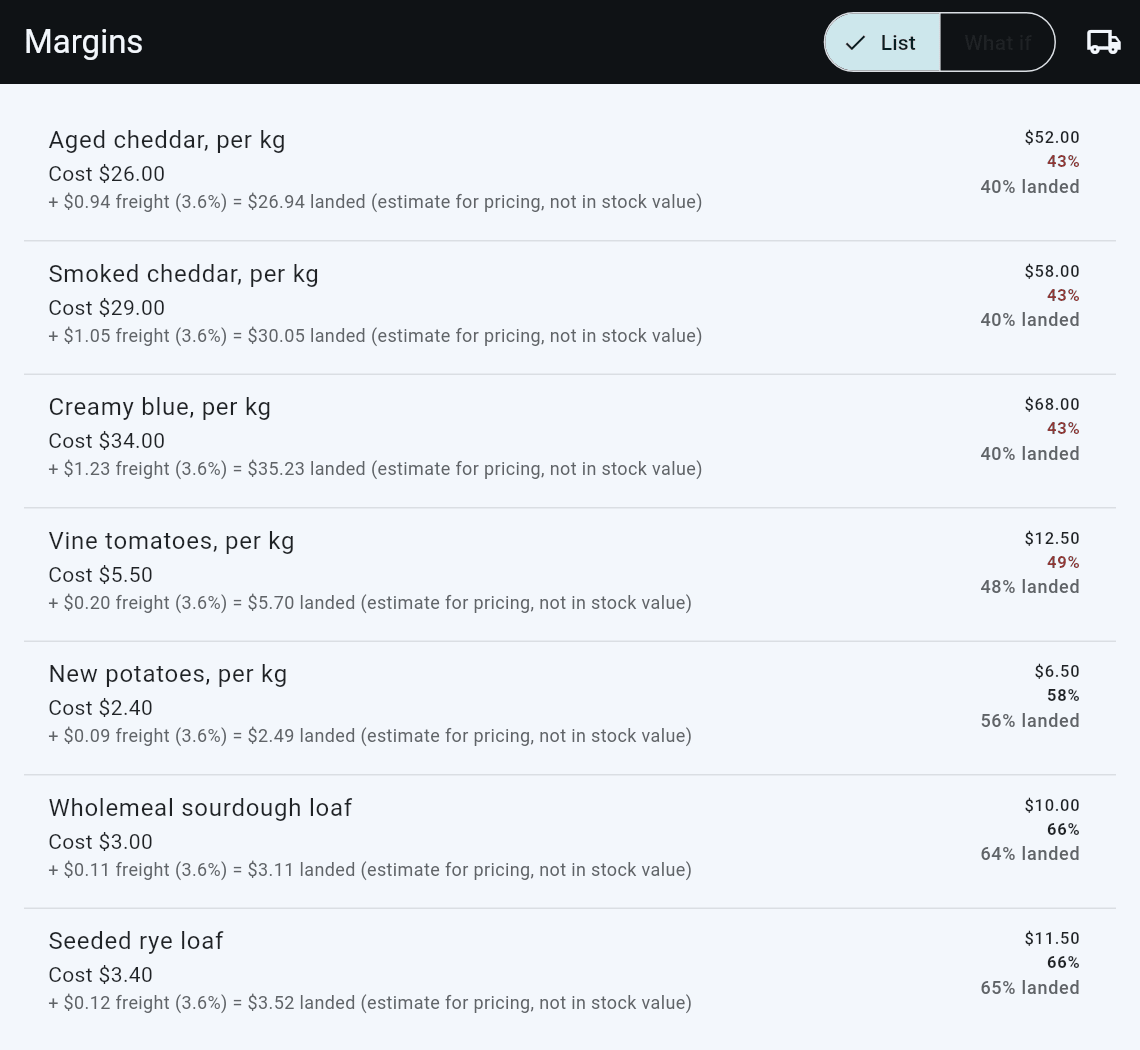
Every product with ingredients, or tracked as itself: its cost, its price, and its margin. A margin under 50% is red.
| Instead of a number | Means |
|---|---|
| No cost | Its ingredients have no cost yet. A delivery, or a cost typed on the ingredient, gives them one. |
| No price | The product has no price, so there is no margin |
How a margin is worked out
Before tax, always.
| White sourdough loaf | |
|---|---|
| Price | $9.50, including 15% GST |
| Price before tax | $8.26 |
| Cost, from its ingredients | $2.80 |
| Margin | ($8.26 − $2.80) ÷ $8.26 = 66.1% |
The tax rate is the product's category's Tax rate % when the category has one, and your shop's standard rate when it does not. It is set on the category, under Sales → Setup → Categories.
A cost is today's cost. A supplier's price rise shows here from the delivery that brought it in; sales made before then keep the cost they had.
What it cost to get here
Once you have recorded freight on a delivery, a second line appears under each cost:
+3.1% freight = $1.46 landed (estimate for pricing, not in stock value)
That is your shop's freight rate applied to this cost, with the margin it leaves beside the raw one. It is an estimate -- a shop-wide average put against one line -- and it is written nowhere: what your stock is worth is still what you paid for the goods. Freight explains why, and what the rate is built from.
What if
"Flour is going up. What does that do to everything with flour in it?"
- Ingredient: start typing and pick one.
- Cost goes to, per ...: the new price, in the unit the label names. That is the item's base unit, which for anything weighed is grams, not the kilos the Stock list shows. Read the label before you type: $1.20 in a per-gram field is $1,200 a kilo.
- Every product that uses it appears, old against new, red where the margin falls:
$2.80 -> $3.05 66.1% -> 63.1%
Nothing is saved while you look.
You can also arrive here already on an ingredient: from What if on its Stock sheet, or from See what this does to margins after a delivery.
Keep the old margin
Under a product whose price would need to move:
Keep the old margin at $10.30 (now $9.50)
The suggestion includes GST and is rounded to the nearest 10 cents.
| Button | Does |
|---|---|
| Update price | Sets that one product's price to the suggestion: White sourdough loaf is now $10.30 |
| Update all 4 prices | Lists every change, old and new, and asks Update 4 prices? first |
| Apply cost | Asks first, then saves the new cost onto the ingredient. This changes the ingredient's cost only -- prices are untouched. |
A product only offers Update price when the rounded suggestion is different from the price it already has.
Changing a price asks for the same approval as changing a price at the till, if your shop has set one. A shop that has set none is not asked.
Apply cost and Update price are separate on purpose. Record a new cost when the supplier tells you; move prices when you decide to.
Good to know
- A category's tax rate is used here, and not yet at the till. Receipts and the day's GST still use your shop's standard rate for every category.
- Freight is not in these costs. It is recorded on each delivery and kept out of what stock cost you.
- A margin is only as good as the recipe. A loaf whose recipe leaves out the butter looks better than it is.